15 May 2013

SYBIS Demo: Implementing BI solutions using Agile/SCRUM methodology


I’ll be presenting at the next Sydney BI Social (SYBIS) group about how to implement a BI system using Agile methodology.

This demo will include some tips and techniques for using Agile in BI implementation and a case study of using TFS 2012 for ALM on a BI project.

You can find out more about this session on the following links:

http://www.meetup.com/SYBISGROUP/

https://www.linkedin.com/groups?gid=4900023

02 April 2013

Sydney BI Social Group (SYBIS)

Sydney BI Social (SYBIS) group is a new event for the Sydney business intelligence community. Organised by myself and James Beresford (www.bimonkey.com), this event will be held on the first Wednesday of each month.

The aim of this group is to provide an opportunity for Sydney BI professionals to get update on the market trends, share ideas and experiences, have a beer or two, and network with other practitioners and experts.

The format will be simple: topics will be suggested prior to the event and will be used to initiate discussions. We will try to have a panel of experts for each session that are experienced in that specific area. They will be sharing their knowledge and experience with the group. You are also welcome to talk about problems that you are facing in your real-life projects or certainly any solutions that you may have and want to share.

We may also have a challenge of some sort, it will be optional, so don't worry!


More details can be found in our LinkedIn group:
https://www.linkedin.com/groups?home=&gid=4900023

Please RSVP using our Meetup group:
http://www.meetup.com/SYBISGROUP

12 February 2013

Magic Quadrant for Business Intelligence and Analytics Platforms 2013


The emphasis from most of the market leaders is on Mobile BI, big data, and data discovery tools that are business-user-friendly. Next trend seems to be data-as-a-service which could significantly grow the market for BI and analytics platforms.

Read the full report here:

http://www.gartner.com/technology/reprints.do?id=1-1DYKLUU&ct=130206&st=sb

Source: Gartner (February 2013)

19 July 2012

SQL Server 2012 BI: The Good, The Bad, and The Ugly

Recently I implemented a BI solution for a client using SQL Server 2012 and wanted to share some thoughts on that.

Reporting Layer

The Microsoft BI presentation layer includes several reporting and analysis tools including: Reporting Services, Report Builder, Power View, Excel, PowerPivot (for Excel and SharePoint), Excel Services, PerformancePoint Services and Visio Services.

Many of these tools have overlapping capabilities that can easily confuse developers and designers at first glance. For instance for ad-hoc functionalities you can use Report Builder, Excel, PowerPivot or Power View.

Number of this tools are only available on SharePoint Enterprise Edition. So if you don’t already have it and don’t want to spend on this costly licence you will miss many of them such as: Power View, PowerPivot for SharePoint, Excel Services, PerformancePoint Services and Visio Services.
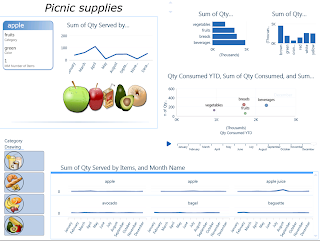
By introducing the Power View, it seems like Microsoft was trying to add more self-service functionality to the stack, but to me this good looking and flashy tool won’t be able to compete with the beloved Excel to get adopted by business users, and it’s certainly not envisioned to be used by IT people either. The other big limitation is that only Tabular databases can be used as the source for Power View reports.


BI Layer

With the new Business Intelligence Semantic Model (BISM), the objective was to have one model for all user experiences: reporting, analytics, and custom applications, in other words “BI for all” based on the same model. Though a big difference is that in SQL Server 2012, Analysis Services is available in two types: Tabular and Multidimensional.

The Tabular model provides the advantage of the table-based approach, DAX queries, and the VertiPaq (xVelocity) which is an in-memory engine. In other words, a server version of PowerPivot without the need of SharePoint or Excel.

The Multidimensional model (cubes, dimensions & hierarchies) is what we had before with UDM, storing aggregated data on disk and using MDX language to query OLAP storage. It doesn’t have major changes since SQL 2008 except for a few fixes and optimizations and improvements.

The problem with that is unlike what Microsoft claimed, there is no such a thing as a unified BI model: BISM models cannot live together on the same SSAS instance and they speak in 2 different languages! Tabular database can be queried with old MDX too, but the point is developers spent so much time to understand and learn MDX (with not much luck!) and now they have to learn a new language and still keep learning the old one too!

Also there are not many tools that can use DAX to query database, currently Reporting Services and Excel 2010 can query the BISM tabular using MDX and PowerPivot and Power View can use DAX, so there is inconsistency in terms of the way you can talk to BISM, however Microsoft claims that this limitation would soon be removed and the developers could use either of the query languages to query data from both multidimensional or tabular types.

As Marco Russo stated in his blog "...there are opportunities in Tabular thanks to the flexibility, but these are very early days and we lack of new client tools able to take advantage of the new model. Power View is just one, but there is space for more."

Do I recommend using Tabular mode? Well, as it’s always the case: it depends. If you are implementing an enterprise BI solution, given the limitations of the Tabular mode I don’t recommend it at all, but if you don’t have a huge data size and you want to build a flexible system fairly quickly, then Tabular is the answer, otherwise use the traditional Mmltidimensional mode.

ETL and data Layer

SSIS had some improvements. Not only it looks nicer and tidier than previous versions, but also there are number of new controls and features in SSIS, such as Change Data Capture (CDC) tasks, scripting improvements and new expressions like LEFT, TOKEN and REPLACENULL, easier troubleshooting & logging, data taps, PowerShell support, etc. I was also very impressed with the data quality components in SSIS and DQS in general. 

Conclusion:

So in overall there are many new BI features and improvements in SQL Server 2012, but what seems to be lacked is a clear and well-defined vision on the BI roadmap. As mentioned, many of their tools are based on Enterprise Edition of SharePoint which is not affordable for small-mid size companies, and some of their tools are also not designed to satisfy enterprise clients. So to me it’s not very clear on where Microsoft is heading to and what type of market they are targeting with these products.


Update: Luke mentioned that Power View is now included as part of Excel 2013, I haven’t got chance to check it yet but am happy that Microsoft is coming to realize that not every company is interested in using SharePoint 2010 Enterprise, so perhaps they need to consider Office clients as the main delivery tool for BI and enrich the functionality of the good old friend Excel in order to have a better market share in BI space.

15 February 2012

Magic Quadrant for Business Intelligence Platforms 2012

As always, very informative report from Gartner analysing the BI vendors, tools and market. Highly recommended for anyone in BI world.


For me the highlights are:

Business vs. IT Driven BI. The conflict remains the same as before: business users demand easy to use, flexible products that put analytic power into their own hands, against IT's desire to maintain standards and create a supportable BI environment with predictable performance and quality data.

There are also other important features in this report, mostly around data discovery tools, Mobile BI, collaborative decision-making, new use cases and content types (real-time, big data, etc.), removing complexity, cloud services, predictive analytics, etc.

For more info:

http://www.gartner.com/DisplayDocument?doc_cd=225500&ref=g_sitelink

http://www.qlikview.com/mq2012

01 June 2011

Top tends in BI arena

I thought I’d share a few of my thoughts on the trends and technologies that are part of my daily life these days. From what I see in the market, the expectation from BI has changed significantly over the past few years. Now all size of companies are looking at investing in BI. They expect to spend less, get more ROI, more data accessibility, more insight into different levels of the business, more flexibility, and quicker response to the ever-changing business requirements.

Agile BI

Traditional waterfall design and development methodologies are too slow and too inflexible for BI. Many companies are now considering Agile for their BI implementations.
But don’t misinterpret what I am calling “Agile BI”, it’s not just about the Agile software development methodology, which is nothing new. IMHO Agile development by itself is not enough for BI, I think a different approach, technologies, and mindset are required to make BI more flexible
An agile software development process doesn't necessarily lead to agile BI, though it will speed up some steps in the process. The technology and processes (e.g. change management process) has to be made more flexible to really achieve agility.
Forrester defines Agile business intelligence as: An approach that combines processes, methodologies, organizational structure, tools, and technologies that enable strategic, tactical, and operational decision-makers to be more flexible and more responsive to the fast pace of changes to business and regulatory requirements.

Collaborative/social BI

Intelligence = Information + People

Collaboration and business intelligence have never been separated, but companies are just recently beginning to realize the benefits of the connection.

By introducing collaborative technologies to their business intelligence platform, companies are better positioned to utilize and take advantage of their employee data.

Collaboration is now becoming an essential part of the business intelligence. It enables crowdsourcing and in general the wisdom of the crowds tend to produce better decisions as organizations become increasingly complex.

Self-service BI

Let the business do it by themselves!
IT is always under one step behind from ever-changing business needs. The concept of self-service BI is to provide capabilities to enable business users exploring data and build their own reports. it may also enable analysts to publish and distribute their work to others.
Used in this way, the visual discovery tools become a nice tool for super users to create web-based reports and dashboards for colleagues. These reports are not static; they are “live” and interactive so casual users can analyse data just as business analysts would without the hassle of starting from scratch.

Predictive Analytics

"Predictive Analytics" is to analyse current and historical facts to make predictions about future events.

More and more vendors are attempting to make it more accessible to information workers and others without advanced degrees in statistics.
Data mining used to be mostly used by large enterprises (e.g. Banks) but these days I see companies in different sizes are started getting benefit from that.
There is also a trend in using social network data in data mining. It can be used to determine the trend, behaviour analysis and reduce customer churn.

18 October 2010

Project Phoenix - ANZ

Project Phoenix, started by SQL Server MVP Arnie Rowland, is a program which awards software, tools and training materials to under/unemployed developers who propose a software project for a non-profit agency, school or church.

More info: http://www.rodcolledge.com/rod_colledge/project-phoenix.html

28 September 2010

To PowerPivot, or not to PowerPivot?

We’ve all seen many presentations about PowerPivot and its great features like in-memory processing which enables Excel to handle millions of records. But the question is when to use PowerPivot as opposed to using a SSAS cube?
Here are some points you need to consider when choosing the tool:
Pros:
 
  • PowerPivot is a powerful tool to gather data from different data sources. It can be used to create POCs or demos in a quick (and possibly dirty) way.
  • It can be used to answer some ad-hoc questions or to play with data (data analysis).

Cons:
  • PowerPivot doesn't support data level security. Whoever gets access to the file can see all data inside it. With SSAS you can implement security at data level.
  • Complicated dimension types (like parent-child) are not supported in PowerPivot
  • Using PowerPivot workbooks as data source for reports may cause version management issues.
  • PowerPivot runs in memory, when you use PowerPivot for all your enterprise data you would need a huge RAM
  • Saving PowerPivot files in SharePoint may cause some issues when the size is too large.
  • SSAS allows you to fine tune your cube but with PowerPivot you can’t.
  • Data can easily be out of control as soon as it is saved on workstation. There also might be huge security risks involved. Even with the SharePoint implementation users have to download data to workstation first, and then publish it to SharePoint.
  • PowerPivot for SharePoint requires Enterprise license and SQL Server 2008R2 EE license. The cost (which is very high) may affect the SharePoint implementations of PowerPivot. By using PowerPivot without SharePoint (Excel add-in which is free) we may end up having even bigger Excel hell!
  • Source data is not always in high quality. We may need to validate and do data cleansing and also more often we need to apply some business rules which can be handled better in SSAS or at ETL level.
  • Working with data from different data sources may require high technical knowledge. Some data isn't that easy to join. A key isn't always available that lets you join data from different sources. It will make it hard for a non-technical person to work with the tool without any IT support.


From what I've seen so far, PowerPivot is not a replacement for Analysis Services, but it certainly has a role for tactical solutions. It also can be used by power users to quickly analyse data, or perhaps to build prototypes of larger scale SSAS implementations.

So I think PowerPivot is great for certain scenarios, but for Enterprise level data warehouse implementation SSAS is the way to go.

23 August 2010

New joy of my life...

This little man has delayed this blog for 4 months! Hopefully I’ll get more time to update this blog more often.

I started using SharePoint 2010 & SQL Server 2008 R2 in my new project and will share some thoughts on them very soon.

19 April 2010

SQL Server 2008 R2 - free ebook

You can download this free ebook from Microsoft Press to learn about new features of SQL Server 2008 R2.

Introducing Microsoft SQL Server 2008 R2, by Ross Mistry and Stacia Misner

Enjoy it!

08 February 2010

Gartner Magic Quadrant for BI Platforms 2010

Once again, Microsoft has been positioned in the Leaders Quadrant of the Gartner Magic Quadrant for BI Platforms (Gartner RAS Core Research Note G00173700 - 29 January 2010)

The full report can be accessed on Gartner’s web site here:
http://www.gartner.com/technology/media-products/reprints/oracle/article121/article121.html


Figure: Magic Quadrant for Business Intelligence Platforms

05 January 2010

Microsoft BI in 2010 – and my New Year’s resolution!


It’s the first week of 2010 and people have got great intensions to stick to their resolutions (I’ve been to the gym once since 1st Jan which is a good start!)

But what about the “Learning” resolutions?

I have been learning about SQL Server 2008 R2 these days and found that there are lots of new things happening in MB BI space. Whether you are a techie who loves learning new stuff, passionate about MS BI, or just want to add weight to your CV, it would be worthwhile watching out these MS technologies in 2010.

1) Master Data Services
2) PowerPivot

3) PerformancePoint Services for SharePoint Server 2010

4) SQL Azure and Cloud Computing

5) Excel Services, VISIO Services and other BI related components and APIs in MOSS 2010

And in terms of "Methodology" and delivery approach, I believe we will hear more about "Agile BI /Data Warehousing" due to the reduced IT budgets in this economy. I'll talk about it in another post.

21 October 2009

PowerPivot & Visio Services for SharePoint 2010


Gemini has got a new name: PowerPivot

Microsoft revealed that it officially branded Gemini as Microsoft PowerPivot for Excel 2010.

“With PowerPivot, users and IT departments can: Integrate massive amounts of data on the desktop from virtually any source; Perform lightning-fast calculations and analysis on large data volumes; Share and collaborate on user generated analysis through integration with SharePoint; Monitor user generated applications,” the SQL Server team representative noted.

Couple of points to consider:

  • PowerPivot for Excel only works with Excel 2010.
  • PowerPivot for SharePoint will require SQL Server 2008 R2 and SharePoint 2010.

For more information about "Managed Self Service BI" and PowerPivot see:


Visio Services: a great visualization tool which allows real time data to be shared on a SharePoint site for those without the Visio client.

Diagrams can connect to an OBDC source such as a SharePoint list, Excel spreadsheet, or SQL Server database. However it can not be used with SSAS or PowerPivot (which is a bit disappointing for BI developers). That's a great feature and I think we may be able to build fancy looking BI dashboards using Visio in near future.

20 October 2009

Self-Service BI?!

We keep hearing about "SELF-SERVE" functionalities in new versions of BI tools specifically with Microsoft plan to delivering BI to the masses.


SQL Server 2008 R2 introduced some self-service options to allow business units and users to create and share BI solutions. Here is what MS says about them:

  • SQL Server Project "Gemini” Add-in for Excel
Enables Excel power users to create BI solutions by streamlining the integration of data from multiple sources enabling interactive modeling and analysis of massive amount of data and by supporting the seamless sharing of data models and reports through Microsoft Office SharePoint 2010
  • SharePoint 2010 based Operations Dashboard
This SharePoint managed service enables front-line operators and administrators to monitor access and utilization of analyses and reports as well as track patterns of hardware usage to help ensure the right security privileges are applied and user generated solutions are available, up-to-date, and managed in a consistent way.
  • SQL Server Reporting Services Report Builder 3.0
This updated ad-hoc reporting client accelerates report creation, collaboration and consistency by allowing users to create and share report components that can be accessed via the shared component library and by enabling the rapid assembly of comprehensive business reports using these shared components.
  • Rich visualization of geospatial data
New support for geospatial visualization including mapping, routing, and custom shapes can help your end users create customized reports that leverage existing content objects, such as queries, data regions, and charts and graphs. You can also enhance location-based data reports with Bing Maps in Report Builder 3.0.


I know many people are excited about them and especially about project Gemini, here are some quotes I found on the net:

  • Gemini enables end users to work with business data
  • 100 million rows on a laptop with Office 2010 Excel
  • Slicers and spark lines in Excel 2010 are bringing BI to everyone
  • Excel 2010 provides BI for the masses by making it easy to build your own charts/graphs on and offline

I agree with all of them, BUT, the question is: are we missing the main goal of BI: “single version of the truth”. Is Gemini leading us to the next generation of “Spreadmarts”? Does having Excel and access to source data make a BI solution?

From my experience, if you ask business-users to do something which requires more than 1 minute of technical training, most probably they get confused, and in most cases, anything more than 5 clicks away is considered as “too technical” and won’t be adobted by business users. So how do we expect them to get this toy and build a BI solution?!


I believe the idea of "Self Service BI" is like a double edged sword, though it can be useful in the same way as we do self-service check out in supermarkets: do it yourself when you don’t have many items, so you can save time, but you will be responsible for that and if you get confused about something, that’s OK, you may ask a staff to help you out with that, but it may take more time than standing in line in the first place.

However, it’s a quick way to discover the underlying data, and can be handy in some cases such as the following scenarios:

  • If a business analyst needs to see what data is available in data sources
  • To analyse source data and create simple reports when underlying data is clean and in simple structure
  • To create a prototype for a reporting solution
  • BUT, when you are dealing with complicated logics to bring data in, or when there are too many data sources and you are not a BI specialist: forget about it!

I don’t want to be negative; I like Microsoft and their BI toolset, but is it the right way to go? Does it lead us to the “BI for masses” idea or towards “messy BI”?!

I’d like to hear your thoughts.

23 September 2009

Handling Ragged/Unbalanced hierarchies in SSAS

What is it?
Balanced hierarchy: In balanced (standard) hierarchies, branches of the hierarchy all have the same level (depth), with each member's parent being at the level immediately above the member.
Example: time dimension, where the depth of each level (year, quarter, month, etc.) is consistent.


Unbalanced hierarchy: the hierarchy branches can have inconsistent depths.
Example of an unbalanced hierarchy is an organization chart. The levels within the organizational structure are unbalanced, with some branches in the hierarchy having more levels than others.
The following charts illustrate the unbalanced hierarchies:


How to handle it on SSAS?
There are 2 methods to handle ragged hierarchies on SSAS:


Using Parent/child dimension
In this method we need to create parent-child dimension. Parent-child dimension can be created on top of a parent-child table/view where each record has a reference to its parent record (e.g. ParentID column). An example of this type of tables can be found on Adventure Works sample database.


Using ragged hierarchy with "Hide Member If" property
Another approach is to design a regular dimension on top of a ragged or unbalanced table/view. Ragged hierarchy: In a ragged hierarchy, the logical parent member of at least one member is not in the level immediately above the member.
Example: geography dimension which number of levels can be different on different countries. The levels provide a meaningful context to its members, thus, while Washington DC is a child of USA, it is included at the City level with Los Angeles. Therefore there will be nulls on some levels.


Note-1: We can also repeat the parent name instead of null as a placeholder.
Note-2: In the example above, 1st and 2nd record will be required when we need to assign facts to non-leaf members. In this example we may need to assign a fact to CA which is a non-leaf member.

Once we create the normal hierarchy, we can use HideMemberIf property to hide Nulls or repeated members.
HideMemberIf Setting
Description
Never
Level members are never hidden.
OnlyChildWithNoName
A level member is hidden when it is the only child of its parent and its name is null or an empty string.
OnlyChildWithParentName
A level member is hidden when it is the only child of its parent and its name is the same as the name of its parent.
NoName
A level member is hidden when its name is empty.
ParentName
A level member is hidden when its name is identical to that of its parent.


Example of an Account hierachy:


Important notes:
  • For large parent-child dimensions, aggregations are created only for the key attribute and the top attribute, therefore queries returning cells at intermediate levels are calculated at query time and can be slow. If you have a large parent-child hierarchy (more than 250,000 members), you may want to consider using a hierarchy with a fixed number of levels.
  • Microsoft recommends using P-C whenever you need to set unary operators.
  • DataMember property only works in parent-child dimensions
  • You can’t cross-join levels on a parent-child hierarchy. It might cause some complications in report development
References and more info:

12 May 2009

BI Seminar

"BI for managers" seminar was successfully held by BI Solutions in Simorgh hotel, Tehran on 22 April 2009.

The aim of this seminar was to introduce Business Intelligence to Iranian managers and show how BI (and Microsoft BI in particular) can deliver critical information to support timely and informed decisions.

More than 60 people from over 20 different companies attended, including representatives from National Oil Company, National Gas Company, National Statistics Org, Iran Khodro and SAIPA which are the largest automotive companies in Iran, and other large organisatons.

The program started with an introductory presentation from me, then Dr Abdollah Zadeh from Amir Kabir University (I can call him "the father of BI in Iran") expanded the subject with his presentation about "BI, Why, How?", then Danial Moazen discussed about problems and challenges that may arise in BI projects.

The event continued with a presentation by Neo Farvashan (MVP) about MOSS and BI, after that I introduced Microsoft BI followed by a demo on MS BI capabilities (PPS Scorecards and dashboards) to provide performance management. At the end I spoke about "implementation of BI solutions" and finished it with Q&A.

I believe it was a very successful event and I would like to thank my friends at BI Solutions and Fanafzar, especially Amir Fassihi who supported me on organising this event.

11 March 2009

New MS BI Burger - Delivering BI to everyone in the organization

After Microsoft announced that Office PPS 2007 would be folded into Microsoft Office SharePoint Server Enterprise 14 - which was officially death of PerfomancePoint Server - there's been slight changes on the famous "Microsoft BI Burger".
The new burger was designed to deliver Business Intelligence to the masses via SharePoint based under idea of "Delivering BI to everyone in the organization".

27 January 2009

Farewell PPS!

"There will be no future version of PerformancePoint Server."

Microsoft will consolidate PerformancePoint Server (PPS) with its scorecards, dashboards, and analytic capabilities into SharePoint as "PerformancePoint Services" with the release of SharePoint 14 in late 2009.

http://blogs.msdn.com/bi/archive/2009/01/23/microsoft-bi-strategy-update.aspx

Not a good news at all for MS BI world! I'm not surprised about "Planning" module as I believe it was NOT successful, but embedding "Monitoring & Analytics" into SharePoint, mmmmmmm?!

Other links:

http://performancepointinsider.com/blogs/bsm/archive/2009/01/22/just-call-me-performancepoint-services.aspx

http://nickbarclay.blogspot.com/2009/01/rip-performancepoint-server.html

23 January 2009

Magic Quadrant for Business Intelligence Platforms, 2009

Gartner is an information technology research and advisory firm which provides research analysis and advice for IT professionals, technology companies and the investment community.

The "Magic Quadrant for BI" by Gartner, presents a global view of Gartner's opinion of the main software vendors that should be considered by organizations seeking to develop business intelligence (BI) applications.

See the full article here: http://mediaproducts.gartner.com/reprints/sas/vol5/article8/article8.html

03 January 2009

Tips for gathering "Business Requirements" in a BI project.

In my opinion the most important and challenging aspect of a BI project is to understand the business requirements. Majority of BI projects failures are due to lack of understanding the business. This lack is primarily due to BI being thought as an IT project, instead of being a business project with IT as one of the enablers.

It's very important to find out "what they need" and not just focus on "what they want". The most effective way of doing that is by "face to face" meetings with managers, business users and IT people. The goal of a requirements interview is to ask questions in order to discover unknown frontiers. Think of it as a one-hour immersion to better understand what business people do and why. How do they make decisions today, and how do they want to be making decisions in the future? First ask interviewees about their roles and responsibilities to get them engaged and from there, cover the following areas:

  • What are the key business objectives?
  • For each objective, ask about measures for success to learn more about key metrics and business dimensions.
  • What roles do data and analysis play in achieving goals? Alternatively, how would better access and analysis benefit them?
  • What are the current analysis challenges?

A good question to get the interview started is "How can people tell when you're doing a great job?"

Be conversational: For the DW/BI practitioner, being conversational means putting yourself into a business frame of mind. Learn the language of the business. Don't intimidate end users by asking "What do you want in a data warehouse?" End users aren't systems designers. Acronyms and IT vernacular don't belong in a business requirements interview.

Several techniques can help you establish a more conversational tone:

  • Learn a bit about the business beforehand by reviewing the Web site or annual report to understand company-specific vocabulary and hot-button issues.
  • Meet with interviewees on their own turf. Go to their offices or conference rooms, rather than IT meeting spaces.
  • Prior to the interview, send out an announcement describing the high-level discussion topics and confirming the interview time and place. Don't attach a detailed questionnaire to this meeting notice. You can't achieve a conversational flow if you're reviewing questionnaire results-presuming anyone bothers to complete the survey.
  • Interview questions prepared in advance are fallback devices, used only if uncomfortable lulls occur in conversations or to ensure key points are covered before ending sessions.
  • Most good conversations tend to wander, so remember your session goals and steer conversations back on track if you stray too far from core issues.
  • Stay at a relatively high level in the interview's early stages. Don't follow an early comment to a very low level of detail, only to run out of time and discover that you haven't discussed three other major areas of responsibility with important requirements for the DW/BI effort.

Listen, and expect to be changed: Good interviewers should be seen but not heard — well, at least not heard too much. Strong active listening skills are required.

As you're gathering requirements from the business users, intersperse some data reality into the process by interviewing key IT personnel, especially the master database administrators responsible for operational systems. Consider what the business needs are in tandem with the availability of data to support these requirements. IT meetings tend to be informal discussions, beginning with knowledgeable project team members. Once you start to hear consistent themes from users, it's time to sit down with the data gurus and get into the extreme detail of their source systems. During these data audit interviews, try to understand whether complete, reliable data is there to support what users are asking for.

There are several methods and resources for BIR, one of the best is "The Data Warehouse Lifecycle Toolkit by R. Kimball, ...".